



With the right prompts and a clear idea of what generative AI can do for you, it becomes the ultimate travel sidekick
For years, I was a “bahala na si Batman” kind of traveler. I was lucky enough to land jobs that took me places, often with flight tickets and itineraries handed to me neatly planned and ready to go. But when it was finally my turn to take the reins and plan a trip myself, I fell straight into so many rabbit holes. I resorted to a mix of old-school digging (I swear by cultural Subreddits), UGC travel fads, and algorithm roulette, endlessly scrolling through TikTok and hoping it heard me whispering “hidden speakeasy” into the wind.
Finding where to go was the nice work—the planning was not.
Then, I turned to AI. So did 41% of North America’s leisure travelers already using AI chatbots to spark travel ideas or map out their trips.
The reviews are fairly mixed. Some treat it like a gimmick and get soulless lists in return, leaving their chats down the drain and only seeing the topline fun of it. Their mistake is not understanding that AI is vast, and you’ve got to play commander to make it talk. You have to ask the right questions in clear, human-sounding language (which means avoiding spelling errors or Taglish) to get yourself a personal travel planner who knows their way around Yelp reviews, remembers exchange rates, and speaks four languages.
Here’s how to use AI, starting with ChatGPT, for seamless travel planning.
General House Rules
- Get rewarded for specificity. You’ll want to feed it more personalized prompts if you don’t want generic or unrelated responses. If you’re traveling as a family with kids, write that down to avoid being rattled by recommendations of daredevils’ corners of the world.
- Don’t dump everything into one chaotic prompt. Break things down step-by-step, like a casual convo with a friend who’s been to your prospective destination.
- Verify. One of AI’s pitfalls is it could be wrong and outdated. If something feels off, whether it’s missing nuance, oversimplified, or just flat-out wrong, do a quick fact-check. Confirm the opening hours, prices, locations, or if the place is even still around. A little extra effort goes a long way.
1. Kick off with a pre-travel checklist
Prompt: “Give me a checklist for planning a trip to [destination], including passport requirements, health protocols, weather prep, and cultural etiquette.”
This is a good place to start if you’re feeling overwhelmed. ChatGPT can help list everything from visa requirements to what clothes to pack based on the weather to what power adapters you’ll need, which is especially useful if you’re hopping across borders. It will also remind you of those small but essential things, like travel insurance or downloading offline maps.
2. Map out your itinerary
Prompt: “Plan a 5-day itinerary in [City] with walking routes, local experiences, estimated transport costs, and non-touristy food spots. [We are a couple going for our anniversary, so we want a bit of romance and some adventure in between.]”
ChatGPT has a special tool called Trip Planner that can help build a daily plan with approximate travel times, activity suggestions, and cost estimates, provided you’re specific in your prompt and the purpose of your trip. To make the itinerary visual and interactive, use Google My Maps (within the Google Maps app) between cities.
If you have places you really want to try, insert them as stops and include an add-on prompt: “I’d like to try these [list of spots]. Based on crowds or popularity, can you insert them and pick the best days to go?”

3. Ask for what to try (with reviews, please)
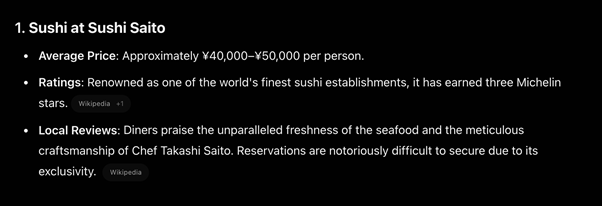
Prompt: “Give me top food experiences in [City] with average price, ratings, and local reviews.”
While some of these may end up on your itinerary, recommendations are a different path altogether. Think of them as suggestions of places you can (and maybe should) check out, but you’re still in charge. Feel free to skip anything that doesn’t fit your budget, taste, or vibe.
Pro tip: You can also ask it to summarize top-rated spots based on Yelp, TripAdvisor, Google Reviews, or even Airbnb insights. Tailor your search according to your preferences: vegetarian-friendly, Filipino-friendly, budget-conscious, outdoor seating, etc.
4. Sort out the VISA stuff
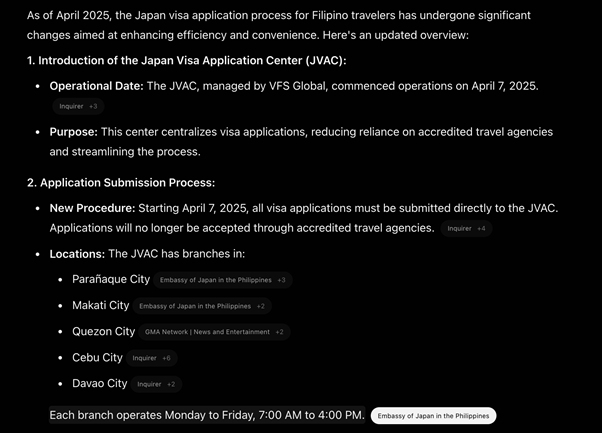
Prompt: “Help me understand the visa requirements, application steps, costs, and average approval time for [Country] if I’m a Filipino passport holder.”
Navigating visa applications as a Pinoy can be an emotional rollercoaster—equal parts hope and scouring through Facebook groups for days, even though experiences vary widely. AI keeps it straight and stress-free, listing embassy links, processing times, and the necessary financial documents.
You can even ask about your chances of approval based on your budget, job, and more. Just take it with a grain of salt and use it as a way to improve your application. It’s no DFA fix, but it helps.
5. Plan the budget without the headache
Prompt: “Create a sample daily budget for a 7-day trip to [City] including food, transport, attractions, and hotel.”
Whether you’re backpacking or bougie-ing, this makes budgeting feel like less of a math problem. Want a more nuanced plan? Ask: “Create a budget for two friends traveling together, mixing budget and mid-range experiences.”
Pair it with TravelSpend (Android/iOS) to track real-time spending in pesos or local currency.
6. Use AI for on-the-go support
Prompt:
“Translate this menu/photo/street sign” (use with Google Lens)
“Give me three indoor things to do in [City] during bad weather”
“Suggest free activities in [City] within walking distance of my hotel”
Even mid-trip, AI can help adjust plans on the fly. Whether it’s finding alternatives when it rains, figuring out public transport, or discovering last-minute nearby spots, it acts like a flexible travel assistant.
AI won’t replace the serendipity of travel, but it does make room for more of it by taking care of the nitty-gritty. So, next time you plan a trip, don’t just Google or rely on the eavesdropping powers of your social media apps. Prompt, pack, and go.
If you still find yourself getting lost on a side street in Kyoto or a boat to the wrong island in Phuket, consider it just part of the magic.
