


When Samsung launched the Galaxy S26 Series at its Unpacked event held in San Francisco, most of the buzz was around its advanced use of artificial intelligence (AI) and the integration of Agentic AI into the system. But some of the, what we think, are useful features aren’t just flashy, but they are practical, the kind consumers will actually use in daily life.
Here’s a quick look at the features that could make a real difference.
1. Screen Privacy
The Galaxy S26 comes with a new screen privacy mode that keeps people around you from seeing what’s on your screen. Turn it on, and the display becomes hard to read from the side, so only you can clearly see messages, emails, or anything else on your phone.
Unlike regular privacy screens, this one adjusts automatically based on how you hold the phone and the lighting around you. That way, the screen stays bright enough for you but stays hidden from anyone trying to peek. It’s perfect for commuting, sitting in a café, or any time someone might glance at your screen.
2. Call Screening
The Galaxy S26 also uses AI to screen calls for you. When an unknown number calls, the phone can answer the call and ask who’s calling and why, then give you a transcript so you can decide whether to pick up.
This helps avoid spam, robocalls, or unwanted sales calls without interrupting your day. You don’t have to answer calls you’re not sure about, and it keeps your privacy intact since the AI does the talking first.
3. Document scan
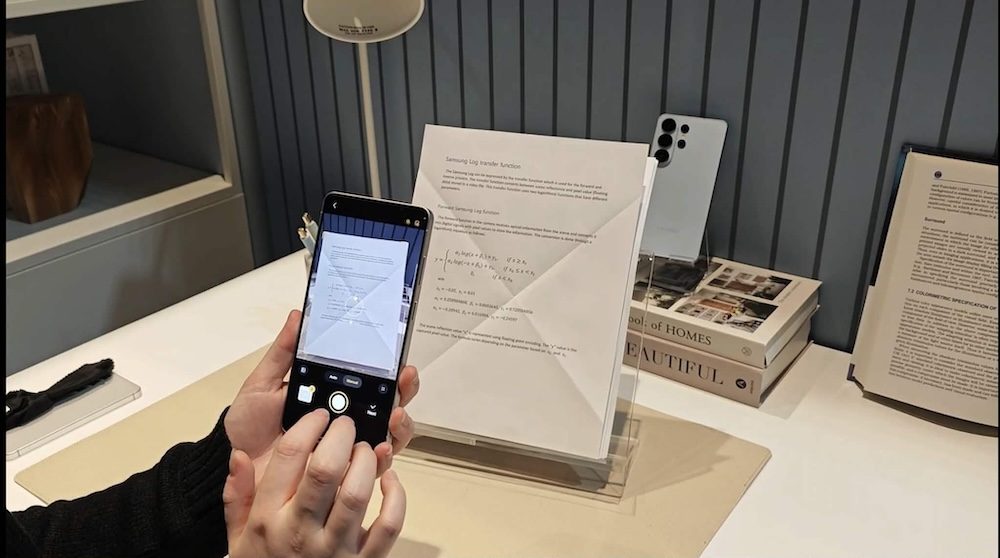
Need to turn a paper receipt, handwritten note, or contract into a digital copy? The Galaxy S26’s AI-powered document scan automatically detects edges, removes shadows, and makes text clearer. You just point and shoot, no more fiddling with third-party scanning apps. Remember when you have to send scanned official documents and they are riddled with folds and creases? They are no more.
It’s perfect for students, remote workers, or anyone who likes to keep digital records organized.
4. Generative AI Photo Assist
Samsung’s AI can also help make your photos look better with a few taps. Want to remove an object, move something around, or adjust your background? The phone fills in the details automatically.
Now, you can also fill in missing pieces. For example, you can add more flowers in an image where there are only three pieces or make a cake whole again. Why is this useful? Gardens are more beautiful when they are filled with flowers and lush greens.
5. Ocean View
This new mode uses AI to enhance outdoor shots, especially landscapes and water scenes. It balances colors, sharpens details, and brings out natural contrasts, making your beach, lake, or city skyline photos look better instantly.
