


Close Menu
Philstar Tech
    • Deals
    • Contact Us
    • About Us
    Philstar Tech
    • Home
    • All Post
    • News
      • Features
    • Tech @Life
    • Reviews
      • Fitness
      • Laptops
      • Mobility
      • Smartphones
      • Wearables
    • Opinion
    • Latest Issue
    Philstar Tech
    Home » Google launches AI-powered fashion try-on for online shopping
    Uncategorized

    Google launches AI-powered fashion try-on for online shopping

    PhilSTAR Tech TeamBy PhilSTAR Tech TeamJune 11, 20262 Mins Read
    Facebook Twitter Pinterest LinkedIn Tumblr Email
    Share
    Facebook Twitter LinkedIn Pinterest Email

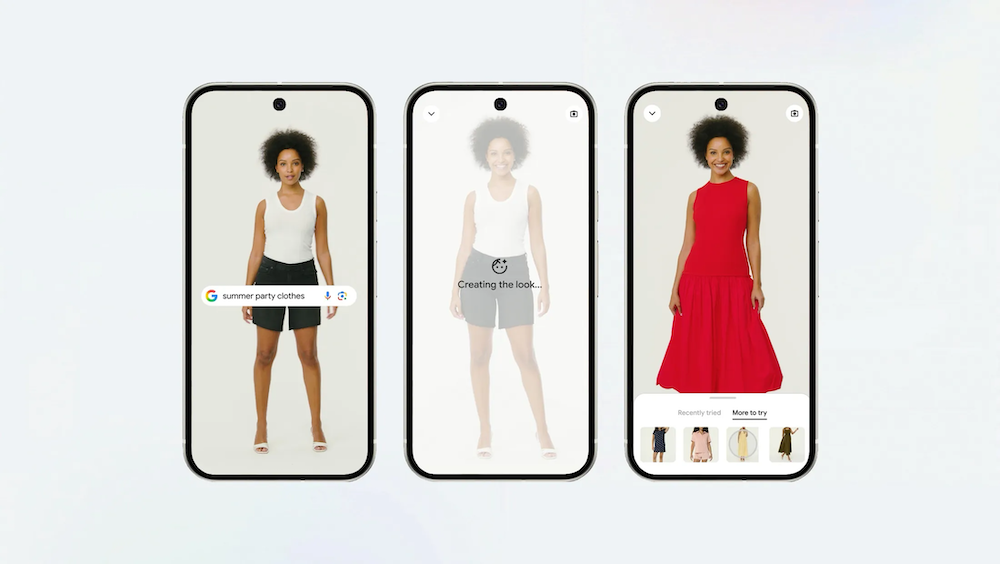
    Google is making online clothes shopping more visual with a new tool that allows users see how outfits look on their own body before buying.

    Whether it is a cardigan for cooler weather, a summer outfit, or clothes for a job interview, it is often hard to imagine how something will look when shopping online. Google’s new Try On feature aims to solve that by letting shoppers preview clothing on themselves using a photo.

    The feature is now expanding to more users and will start rolling out in the Philippines in the coming weeks.

    Google said the tool uses a custom image generation model built for fashion. It is designed to understand how clothing fits the human body, including how fabrics fold, stretch, and drape. Instead of showing clothes only on models or flat product images, the system applies the item to a user’s uploaded photo so they can get a more personal view of how it may look in real life.

    Try On works across a wide range of items, including tops, bottoms, dresses, and shoes such as sneakers, heels, and sandals. It pulls products from Google Shopping and Search, as well as listings shown in Google Images.

    Users can try multiple outfits, compare looks, and save or share their favorites. If they decide to buy something, they can tap a shop button that redirects them to the retailer’s website.

    How to use Google Try On

    1. Open Google Search, Google Shopping, or Google Images
    2. Tap on an apparel product listing
    3. Look for and select the “Try it on” icon
    4. Upload a full-length photo of yourself
    5. Wait a few moments for the virtual try-on result to load
    6. View how the clothing looks on your photo
    7. Try other colors, styles, or items if you want to compare looks
    8. Save or share your favorite outfits
    9. Tap the shop button to buy from the retailer’s website

    Google said the goal is to make online shopping feel closer to the in-store experience, where fitting rooms help shoppers decide if something is right for them.

    Share. Facebook Twitter Pinterest LinkedIn Tumblr Email
    PhilSTAR Tech Team

    The editorial team of PhilSTAR Tech.

    Related Posts

    Acer keeps lead in Philippine laptop market

    July 13, 2026

    Smart brings Rokid AI Glasses with Google Gemini to Philippines

    May 27, 2026

    Xiaomi power bank series built for everyday charging needs

    May 12, 2026

    Most Popular

    Instagram finally settles what happens when you unlike an old post

    July 30, 20262 Mins Read

    Facebook rolls out free verification badges for users

    July 29, 20262 Mins Read

    Win one of 101 HONOR gadgets with just one comment

    July 24, 20262 Mins Read

    Marcos says PH will launch its own rocket in 2027

    July 27, 20261 Min Read

    Shokz OpenDots 2 debuts in PH, priced at PHP 12,990

    July 29, 20262 Mins Read

    Review: The travel gadgets that proved useful when my suitcase almost went missing

    July 30, 20266 Mins Read

    Latest

    Color Game Ultimate Jackpot crosses P100-million mark

    By PhilSTAR Tech TeamJuly 31, 20262 Mins Read

    REVIEW: Ctrl + Opt + Out

    By AJ GabrielJuly 30, 20264 Mins Read

    Instagram finally settles what happens when you unlike an old post

    By Dawn SolanoJuly 30, 20262 Mins Read

    Review: The travel gadgets that proved useful when my suitcase almost went missing

    By Dawn SolanoJuly 30, 20266 Mins Read

    Shokz OpenDots 2 debuts in PH, priced at PHP 12,990

    By Nick James ArillaJuly 29, 20262 Mins Read

    Facebook rolls out free verification badges for users

    By Dawn SolanoJuly 29, 20262 Mins Read
    Copyright © 2026 Philstar Tech | Powered by The Philippine STAR

    Type above and press Enter to search. Press Esc to cancel.